Plugin Guides
In depth guides for each of the plugins
- Written by Failed4life
- Advanced Boss Swapper
- Advanced Swapper
- Auto Pray Flick
- Auto Clicker
- Auto Spec 2
- Banking Helper (Bank Presets)
- BankStander (High Risk Plugin)
- Boss Swapper
- Combat Helper
- DT Assist (DT2 Bosses)
- Delve Assist
- Foundry Assist
- GOTR Assist
- Guthix Swapper (Tormented Demons)
- Hunllef Helper (Gauntlet)
- Jad Swapper
- Left Click Cast
- Logout Helper
- Muspah Assist
- NMZ Helper (High Risk Plugin)
- Never Log
- One Click
- Phosani Swapper
- Rat Swapper (Scurrius)
- Runecrafter (High Risk Plugin)
- Smart Click
- Tomb Assist (TOA)
- Zulrah Swapper
- [BETA] Yama Helper
Advanced Boss Swapper
⚠️ Important: Be sure to offtick the minions/monsters, otherwise the plugin will not be able to flick properly!
Configuration
Enable
- Click "not set" and choose a hotkey to toggle the plugin on/off
Generic Boss Config
Disable Defensive Prayers
- When enabled, if all monsters are dead, the plugin will turn off your Overheads
Disable Offensive Prayers
- When enabled, if all monsters are dead, the plugin will turn off your Offensive Prayers
Guess Pre-Prays
- The plugin will attempt to guess the tick a monster will attack on when it spawns
- If kiting a boss around the room, disable this option
- Turn this setting OFF if doing Dagannoth Kings
Offensive Prayer
- Having this enabled will allow the plugin to use offensive prayers based on your target (DKs and Demonics)
Dagannoth Kings
- Choose the offensive prayer to use against each boss
- Turn off Guess-Pre Pray setting!
Demonic Gorillas
Gearswaps
- Gearswaps to melee or range gear, based on what the Gorillas is praying
- This plugin supports Advanced Swapper sets!
- Use
id,id,idformat orswap:SetName(e.gswap:DemonicMelee) - Item IDs can be found by using the Gsoft Manager plugin, enable the "Inventory IDs" setting
Melee/Ranged Prayer
- Which offensive prayer to use when using Melee, or Ranged
Commander Zilyana
Always Protect Magic
- This will make you keep Protect from Magic on while Zilyana is alive
- Useful when Meleeing
K'ril Tsutsaroth
Defensive Prayer
- Which Overhead prayer to swap to when K'ril is about to attack you
Advanced Swapper
General Info
- This plugin has its own sidebar icon for creating and managing swaps
- Click on the "Help" tab to see all the valid swaps - They are also listed at the bottom of this guide
- Strings support both item IDs and Names
- Item IDs can be found using the Gsoft Manager Plugin's "Examine Debug" or "Inventory IDs" settings
- Item identifiers and opcodes can be found using the Gsoft Manager Plugin's "Menu Debug" setting
- Ability to drop all of an item in your inventory using the argument:
drop:ItemIDordrop:ItemName. Bind it to a hotkey or press the 'equip' button in the sidebar, and watch it drop all of that particular item in a flash!
Starter Guide
LMS Swaps
These are some helpful LMS swaps provided by the community
LMS Swaps Configuration
- Tips for LMS
- Drop lower tier gear as you upgrade
- Don't have multiple spec weapons
- Adding the swaps example video
Video Guides
Opcode/Identifier Examples
Use the Gsoft Manager Menu Debug setting to find opcodes and identifiers
Equip Item name or ID
e:Item:identifier
• Example clicking a specific item option e:amulet of glory(:65542 would teleport to Edgeville when the glory is in your inventory
Remove Item name or ID
r:Item:identifier
• Example to teleport with equipped jewelry r:amulet of glory(:2 would teleport to Edgeville when the glory is equipped
Use Item name or ID
u:item:opcode:identifier
• Example using an item on another item
u:arrow shaft:25:0
u:feather:58:0
The first being the "use" option on the right click of the first item and then the "use item -> item" opcode and identifier for the second item
This can also be used for something like enchanting jewelry, manually cast the spell once first and then have the below for something like lvl 1 enchant
u:sapphire ring:58:0
Drop Item name or ID
drop:Item:opcode:identifier
• Example opening rune/feather packs drop:pack:57:2
Object Object name or ID
o:Object:opcode:distance distance is optional, do not add the :distance if not using it
• Example clicking the smelt option Edgeville furnace o:16469:4
If we wanted it to only click the furnace if we were within 3 tiles of it, we'd do o:16469:4:3
Valid Arguments
Below is a list of all valid arguments
Comments are supported with:
/ or // or # or ##

a:last
a:cast
a:player
a:id:###  (replace ### with the npc ID)
attack:last
attack:cast
attack:player
attack:id:###

c:Spell Name
cast:Spell Name

e:id
e:Item Name
equip:id
equip:Item Name

o:name
o:name:opcode

r:id
remove:id

p:Prayer Name
p:disable
p:disable:Prayer Name
prayer:Prayer Name
prayer:disable
prayer:disable:Prayer Name

u:id
eat:id
use:id
eat:Item Name
use:Item Name

drop:id
drop:Item Name

spec
walkunder

Equip, Remove, and Use arguments support | (or) operators, for example

e:25865|12926
Auto Pray Flick
General Info
- This plugin can be used for a variety of activities other than just to aid in Pray Flicking
- Auto Pray Flick will click where your mouse pointer is, unless MouseEvents is enabled, then it will click on your Quick Prayer Orb
- If you have Double Click Mode turned off, the plugin will do 1 click every game tick, which is useful for various things, some notabable examples being - Enchanting bolts, 1t cooking Karambwans (pair with One Click), using Bones on an Altar (pair with One Click) and the Enchantment room in MTA (pair with One Click)
Config
Auto Clicker
Main Config
Toggle
- Click “not set” and press a keyboard button to choose a hotkey that will turn the Auto Clicker on/off
Delays - All delay values are in milliseconds. 600 = 1 game tick and 1000 = 1 second
- Absolute Delay Min: The absolute minimum delay it can use. The fastest click time
- Absolute Delay Max: The absolute maximum delay it can use. The slowest click time
- Delay Target: The peak of the curve, the value most commonly used. This number should be somewhere between the Min and Max
- Delay Deviation: How far it can deviate from target and still remain common. This number will be added, or subtracted, to the Delay Target and kept within the Min and Max
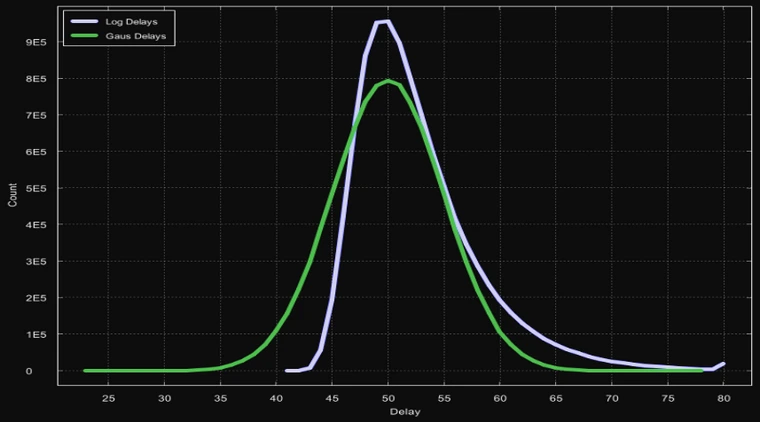
- Weighted Distribution: (Highly Recommended) This will turn the standard bell curve into a right shifted bell curve (Example Below)
Use MouseEvents - Due to changes RuneLite made, this is always forced on, even if it's unchecked
- This will make the plugin use MouseEvents to click where you mouse was when you toggled the plugin on, instead of clicking where your mouse currently is, no longer requiring your mouse. Using this does increase the risk of the plugin
Click Distribution Examples
- Below is a picture of a 10,000,000 click sample size at settings min=20, max=80, target=50, deviation=5
- Blue is a weighted distribution
- Green is the standard distribution

Auto Spec 2
Initiate Combo
- Click "not set" and press a keyboard button to choose a hotkey that will cause the plugin to do your spec combo
- Automated specs can be done using the "Damage Threshold" setting found lower in the settings
Spec Items
- Enter the ID(s) of the spec weapons you'd like to use, in order from 1st to 4th
- Item IDs can be found by using the Gsoft Manager plugin, enable the “Inventory IDs” setting
Min Spec
- The minimum amount of spec you must have in order to use each weapon
Damage Threshold
- The minimum amount of damage you must hit in a single hit for the spec to auto trigger
- Set this to a high number if you do not want the plugin to auto trigger
Equip Gear on Spec
This section of the config is not for weapons
id,id,idformat- List gear that you want the plugin to equip when it's time to spec, such as switching to a Void melee helm
- Item IDs can be found by using the Gsoft Manager plugin, enable the “Inventory IDs” setting
Enable Prayer
- Choose an offensive boosting prayer to swap to when it's time to spec
Enable Follow Up
This config option is for a follow up weapon
id,id,idformat- Input the weapon ID for the plugin to swap to after speccing, such as an Elder Maul, or even back to your main hand/offhand
- Item IDs can be found by using the Gsoft Manager plugin, enable the “Inventory IDs” setting
Enable Overhead Checks
- The plugin will not attempt to spec if the player you're fighting is praying the specified prayer
Disable Distance Checks
This setting is recommended to be checked, especially if using range/mage
- Enabling this will stop the plugin from checking if you are far away from your opponent, or frozen, before attempting to spec
Disable Swap Delay
This setting is recommended to be checked for all spec combos
- Enabling this will remove the delay before swapping to your spec weapons before a valid hit registers
Banking Helper (Bank Presets)
General Information
- This plugin has its own sidebar icon, click on "Valid Arguments" to see all the valid swaps
- Supports both item IDs and Names - names uses [contains] so something like
w:ring of dueling-1would withdraw any charge dueling ring - Item IDs can be found by using the GSoft Manager Plugin, using the “Examine Debug”, or “Inventory IDs” Options
- Setting a withdraw quantity to “28” will “withdraw all” of that item - eg
w:5972-28 - Noted items can be withdrawn by using (-n) - eg
w:5972-28-n
Now onto the plugin config...
Msg on Hotkey
- This will display a message in chat when you activate a Banking Helper hotkey
Gear Sets
- Select your Set...
- Dropdown list of all stored Banking Helper presets. Switch it back to the "Select your set..." option to create new sets
Set Editor
- Set String
- This is where you place your string(s) for what actions you’d like the Banking Helper to perform. Any changes you make here will IMMEDIATELY overwrite your currently selected set. If you are editing a set you’ve already made, there are no automated backups of the changes you make.
Valid Arguments
The full List of Arguments can be found at the bottom of this guide
- This is a list of all of the valid arguments for your Banking Helper Set Strings. You can place comments in your string by using /, //, #, or ##. For example if you wanted a comment after you withdraw a single lobster:
W:379-1 // Withdraw 1 Lobster
- *Important - You can now add a tick (0.6 seconds) delay in between functions by using the argument:
tick- This is also stackable so you can place multiple ticks back to back to time your withdrawals better. This may even help in situations where your ping isn’t the greatest. For example:
d:inv // Deposit Inventory
tick // Wait 1 Tick
d:eq // Deposit Equipped Items
tick // Wait 1 Tick
e:25886 // Equip BOWFA
w:2434-5 // Withdraw 5 Prayer Potions
tick // Wait 1 Tick
tick // Wait another Tick
close // Close Bank
- This is not required by any means as the Banking Helper should be able to perform most strings without fail, but for advanced cases the “tick” argument can be tremendously useful.
Hotkey
- Click and set a hotkey (or hotkey combination) of your choice to activate this currently selected set.
Withdraw
- Click to withdraw the currently selected set - no hotkey needed!
Delete
- Click to delete the currently selected set - a confirmation prompt will appear to ensure you want to delete it.
Create a Setup
-
Save Inventory as Set:
- Automatically store your current inventory and equipped items into a set. It will automatically order it by equipment first, then will withdraw your inventory. Once you click this button you will have to enter a name for your set. Once chosen it will then be selectable in the Gear Sets dropdown.
-
Save String as Set:
- If you're manually entering a string to create a new set, you NEED to save it by using this button. Once you click this button you will have to enter a name for your set. Once chosen it will then be selectable in the Gear Sets dropdown.
Valid Arguments
- Below is a list of all Valid Arguments
d:id
d:inv
d:eq
deposit:id
deposit:inv
deposit:eq

e:id
eq:id
equip:id

w:id
with:id
withdraw:id

eat:id

open
close
tick
BankStander (High Risk Plugin)
General Info
- Most banks are supported, but not all of them are, such as Culinaromancer's Chest, Pest Control, Lunar Isle, or the TOA Camel
- Anvil smithing supports Varrock West bank and Prifddinas
- Item IDs can be found by using the Gsoft Manager plugin, enable the “Examine Debug" or "Inventory IDs” setting
Enable
- Click "not set" and choose a hotkey to toggle the plugin on/off
Cooking Config
- To Cook (Basic Cooking method)
- Format is raw food id:quantity to withdraw (eg cooking Raw Sharks
383:28)- Option - Which option in the chatbox popup to select (Usually 1)
- Format is raw food id:quantity to withdraw (eg cooking Raw Sharks
Lunars Config
- Logs - ID of the log you're using for Plankmake
- Jewelry - ID of the unstrung jewelry for String Jewelry
- Leathers - ID of the untanned hide for Tan Leather
- Seaweed/Sand - IDs of the Seaweed, or Giant seaweed and buckets of sand for Superglass make, followed by quantity
- Example below for giant seaweed and buckets of sand
21504:3
1783:18
Potion Config
- Herbs to Clean - ID of grimy herb
- Herb for Unfinished - ID of clean herb you're combining with vials of water
- Potions to Craft - ID:Quantity to withdraw for each ingredient, a new line for each
- Prayer pots example:
99:14
231:14
- Super Combats example:
2436:7
2440:7
2442:7
269:7
Fletching Config
- Logs to Fletch - ID of the log you want to fletch
- Bow to string - ID of the unstrung bow you want to string
Crafting Config
- Orb to combine - ID of the charged orb you want to use on battlestaves
- Gems to cut - ID of the uncut gem
- Hide to thread - ID of the tanned hide
- Jewelry - Which gem/bar to smelt at Edgeville to craft jewelry
- Mould - Which mould to use
Options
- Fletching Option - Which interface number to select (eg 1 for arrow shafts, 2 for shortbow, 3 for longbow)
- Glassblow - What to glassblow
- Hide - What to craft with hides
- Bars - What bar to use for Anvil smithing
- Smith - What to smith for Anvil smithing
Boss Swapper
General Info
- Supports Olm, Nylo, Hard Mode Nylo, P3 Verzik, Hard Mode P3 Verzik, Nightmare and Phosani's Nightmare
- Entry mode TOB is not supported
Toggle
- Click "not set" and choose a hotkey to toggle the plugin on/off
- You will see "Boss Swapper Activated" in your chatbox when the plugin is on
Olm Config
- By default, swaps overheads against Olms special attacks
- Swap on Auto Attacks - Will switch your overhead to whatever Olm attacked with last
Nylo Config
- Gearswaps: This plugin supports Advanced Swapper sets!
- Use
id,id,idformat orswap:SetName(e.gswap:NyloMage) - Item IDs can be found by using the Gsoft Manager plugin, enable the “Inventory IDs” setting
- Attack Nylo Boss - Will automatically attack the boss after the plugin swaps your gear and overheads
Sotet Config
- Automatically swaps Range and Mage overheads against Sotetseg when the plugins is enabled via hotkey
- Melee Prayers - Will automatically swap back to Melee overhead if in Melee range
Nightmare Config
- Automatically swaps Range and Magic overheads against Nightmare and Phosani when the plugin is enabled via hotkey
- (Optional) Enable Melee Prayer - Will also swap to melee overhead
Combat Helper
Main Config
- Enable: Click "not set" and choose a hotkey to toggle the plugin on/off
- Privacy: When checked, it will hide the Combat Helper infobox
- Attack Tick Offsets: This is for the Attack Tick setting in Prayer Config to help adjust incorrect flick times
- Format is
MonsterName:TicksegGoblin:1would flick 1 tick sooner - use a new line for each
- Format is
Prayer Config
One Tick and One Tick - OOC are considered very high risk - Auto Pray Flick plugin is a safer pray flicking alternative
- One Tick: This will one tick flick your quick prayers, only while you're in combat/being targeted
- One Tick - OOC: This will one tick flick your quick prayers at any time, even when not in combat
- Attack Tick: This will attempt to flick overheads against the monster you're fighting. Right click the monster and choose which overhead to pray. Not all monsters are supported, use with caution
Arceuus Config
- Use Death Charge: Automatically casts Death Charge
- Use Mark of Darkness: Automatically casts Mark of Darkness
Consumables Config
Only in Combat
- Will only Pray Flick, Eat, Drink potions, etc. when in combat
- Interacting with NPCs, or having a pet/follower will cause the plugin to think you're in combat!
Switch to Inventory
- This will make the plugin switch back to your inventory any time it needs to consume an item
Eat Food
- This will eat anything in your inventory with an Eat option, starting from the top -> down
Drink Pray Pots
- Supports Prayer potions, Prayer regeneration potions, Super restores, Sanfew serums, Blighted super restores, Moonlight moth mix and Moonlight potions
Drink Super Combat/Sets
- Supports Super Combat, Super Attack, Super Strength and Divine Super Combat potions
Drink Ranged Pot
- Supports Regular, Bastion and Divine versions
Drink Magic Pot
- Supports Regular, Battlemage and Divine versions
Drink Goading Pot
- Drinks a dose of Goading potion whenever one is not active
Drink Antifire
- Supports all antifire potions
Drink Antipoison
- Supports all antipoison, antidote and antivenoms
Boost Repot Offset
- How many levels above your base level you want to repot at
Imbued Heart
- Automatically boost using the Imbued Heart, or Saturated Heart
Thrall Config
- Thrall Type - Which thrall to summon
- Prayer Threshold - The minimum amount of prayer points you must have to continue summoning thralls
- Disable Combat Check - If switched on, it will summon a thrall whether you are in combat, or not
Cannon Config
- Refill Cannon - Automatically refills your Cannon when at/below your Cannonball Threshold (Does not repair Cannon)
- Cannonball Threshold - How many balls left in your cannon for it to trigger the auto refill
Slayer Config
- Glove Swap: Automatically swaps to either of the Slayer bracelets as a monster is dying and then back to your combat gloves
- Minimum Hp Override: In the event of monster hp miscalculation, what hp should we force the bracelet swap?
DT Assist (DT2 Bosses)
General Info
- Supports all 4 DT2 Bosses, including the Awakened versions
- ⚠️For Vardorvis - If you have the "Vardorvis Projectiles" Plugin Hub plugin, either turn it off or uninstall it. It will break the ranged pray swap
- Yes Leviathan pray swaps are supported, as long as the plugin is enabled via hotkey, there just aren't any customizable settings for it
Main Config
- Enable: Click "not set" and choose a hotkey to toggle the plugin on/off
Duke Config
- Draw Poison - Overlay and Timer for the Poison Trail
- Draw Slams - Overlay and Timer for Slam attacks
- Draw Vents - Overlay and Timer for the Vents
Leviathan Config
No customizable config - Will auto pray swap if the plugin is enabled via hotkey
Vardorvis Config
If you have the "Vardorvis Projectiles" Plugin Hub plugin, either turn it off or uninstall it. It will break the ranged pray swap
- Auto Captcha: Automatically solves the "captcha" popup throughout the fight
- Draw Axe Telegraph: Overlay for where the Axe attacks will travel
Whisper Config
- Use Blackstone: Automatically use the Blackstone when needed
- Auto Ice Barrage: Automatically casts Ice Barrage on the Whisperer when it binds you
- Conserve Prayer: Turn off prayers when they're not needed
- Ghost Swap: Auto Gear Swap when the Ghosts spawn
- Draw Ghosts: Overlay for best Ghosts to attack
- Draw Leeches: Overlay for which seeds need attacked
- Draw Pillars: Overlay for which pillars to stand behind
- Draw Tentacles: Overlay for the slam attacks
Thrall Config
- Duke: Which thrall, if any
- Vardorvis: Which thrall, if any
Delve Assist
Main Config
- Enable: Click "not set" and choose a hotkey to toggle the plugin on/off
- debug: This is for debug purposes, leave it unchecked
- Disable Prayers on Death: Automatically turns off prayers (except Preserve) when the boss dies
- Melee Prayer Check: Turns on Pray Melee when in melee range
Swap Config
Supports Advanced Swapper sets (swap:SetName) and (id,id,id) formats
- Melee Punish: What to swap to during the Melee Punish phase
- After Punish: What to swap back to afterwards
- Car Punish: What to swap to during the Car phase
- After Car: What to swap back to afterwards
Overlay Config
- Boss tick Counter: Show a tick counter on the boss
- Outline Boss Punish: Shows an outline on the boss when it's vulernable to melee punish
- Larvae Icons: Show icons on the larvae - always, close, or never
- Larvae Outline: Show outlines on the larvae - always, close, or never
- Distance Threshold: If Icons/Outline are set to Close, within how many tiles should the larvae be for icons/outlines to render
Thrall Config
- Thrall Type: Which Thrall to summon
- HP Threshold: If the Boss' HP is below this number percentage, no longer summon a thrall
- Max Delve Level: Max delve level to summon a thrall, 1-8
Foundry Assist
General Info
- The entire smithing process of this plugin is fully automated, the few manual steps you must do are listed below
Manual Steps
- Start a commission
- Set your moulds (use Easy Giant's Foundry plugin hub plugin to help with this)
- Add your bars/items to the Crucible
- Pour
- Pickup the Sword
- After that it will fully smith the sword for you
Get the "Easy Giant's Foundry" plugin from the RuneLite Plugin Hub for an even more relaxed experience!
GOTR Assist
General GOTR Assist Features
This plugin is not fully automated, it only helps during certain portions of the minigame to make it more laid back
- Automatically fills pouches and resumes workbench crafting and mining the large guardians
- Upon entering a rift - it will automatically click the altar, craft all essence, drop "trash runes", and leave the rift
- Supports Combo Runes - Use Air runes for points, or Water runes for better gp. Have magic imbue and binding necks if doing combos
Bot Config
- Toggle: Click "not set" and choose a hotkey to toggle the plugin on/off
Gotr Config
- Enable Pouch Overlay - When switched on, it will show an overlay of the amount of Essence in each pouch
- Trash Runes - Automatically drops the enabled runes after crafting them. Hold control (command key if on Mac) and click to select multiple, or to turn them off
Guthix Swapper (Tormented Demons)
General Info
- This plugin also supports the While Guthix Sleeps boss, auto overheads and can do gear swaps
- Specifically for the While Guthix Sleeps boss, gear swaps are hardcoded using Advanced Swapper sets named
melee,ranged, andmagefor the respective styles
- Specifically for the While Guthix Sleeps boss, gear swaps are hardcoded using Advanced Swapper sets named
- Overlays show the TDs attack tick timer and a timer for when the "binding attack" will happen
Main Config
Supports Advanced Swapper sets (swap:SetName) and (id,id,id) formats
Must use Melee and Range, or Mage for TDs. You cannot do just Range and Mage
- Enable: Click "not set" and choose a hotkey to toggle the plugin on/off
- Melee Gear: Your main melee gear
- Melee Heavy Gear: Your Heavy Melee weapon gear, Heavy Melee weapon examples are Dharok's greataxe (set to Crush), or Obby maul
- Range | Mage Gear: Your main ranged, or mage gear
- Range | Mage Heavy Gear: Your Heavy Ranged weapon gear, Heavy Ranged weapon examples are Heavy ballista, or Dragon crossbow - these must be set to Accurate style. There aren't any Heavy Magic weapons
Hunllef Helper (Gauntlet)
General Info
- Supports for Regular and Corrupted Hunllef
- 5:1 method is not supported, however you can disable the "Swap Weapons" setting and do it yourself, while the plugin still does the other features for you
Bot Config
- Enable: Click "not set" and choose a hotkey to toggle the plugin on/off
Hunllef Config
- Drink Prayer Pots: Drinks Prayer (Engiol) potions when your prayer points are low
- Swap Weapons: Automatically swap weapons when Hunllef changes overheads
Prayer Config
- Use Offensive Pray: Enables auto swapping offensive prayers based on the attack style you are currently using
Jad Swapper
General Info
- Supports Jad, Triple Jad, and all of the Jads in the 1-6 Jad Challenge - this includes Jads in the Inferno
- If Jad is not on screen, the plugin will not be able to change prayers
- In the fight caves, Jad spawns where the Orange 360 spawned, stand near that area for best results
- Does not support Melee!
Main Config
- Enable: Click "not set" and choose a hotkey to toggle the plugin on/off
- Privacy: Having this checked will hide the Jad Swapper infobox
Left Click Cast
General Info
- Left Click Cast allows you to quickly swap which spell will be cast when you left click on a monster or player with a hotkey of your choice
- Allows up to 6 different spell swap hotkeys
- Allows you to select any combat spells from the Standard or Ancient Spellbook, but you MUST be ON that spellbook (you cannot cast Ancient Magicks while on the Standard Spellbook or vice versa).
Preset
Friend/Clan Checks
- Enabling this will make it so you can't cast on Friends, Clan members, or Castle Wars teammates
Staff Check
- This setting will determine when you want to be able to Left Click Cast a spell
- Custom - Only Left Click Cast when the specified weapon ID is equipped
- Combined - Left Click Cast when any Staff, or Custom weapon ID is equipped
- None - Always Left Click Cast, regardless of what weapon you have equipped
- Custom Staff IDs:
id,id,idformat for the specific weapon ID(s) you must be wielding in order for Left Click Cast to be active if using the Custom setting - Use Whitelist: Will make it so Left Click Cast will only work on the NPCs listed in the config below
- Whitelisted NPCs:
id,id,idformat for the specific NPCs that you want Left Click Cast to work on
Hotkeys
- Configure the following to any hotkey/combination of keys that you’d like:
- Disable Left Click Cast: Setting a hotkey here and pressing it will disable Left Click Cast
- Swap to Spell #1 through #6: Set a hotkey and press it to swap to the corresponding spell number selected in the config below
Spells
- Select a Standard or Ancient Magicks Spell for any of the 1-6 spell swaps you'd like
Logout Helper
Main Config
- Disable: Click "not set" and choose a hotkey to toggle the plugin off/on
- Privacy Mode: Having this checked will hide the Logout Helper infobox
Bot Config
Logout Action
- Uses an Advanced Swapper set to allow the plugin to Teleport
- The format is
swap:YourSetName- replaceYourSetNamewith the name of your Advanced Swapper set - You can list multiple different teleport methods in your Advanced Swapper set and Logout Helper will utilize whichever one you have with you. If you do not have any methods, it will attempt to logout instead
- Not recommended to pair this setting with Disable PvP Checks, unless in a PvP World
- An example teleport Advanced Swapper set might look something like the following:
u:royal seed pod
e:amulet of glory(:65542
r:amulet of glory(:2
r:ring of wealth (:3
- The example set above would attempt to teleport with a Royal seed pod, teleport to Edgeville with a glory that is in your inventory with any number of charges, teleport to Edgeville with an equipped glory with any number of charges, or teleport to the Grand Exchange with an equipped ring of wealth with any number of charges. It will skip over any that you don't have, so listing multiple options is recommended
- Image examples of your Advanced Swapper set and Logout Helper config can be found here and here
Disable PvP Checks (Required for PvP Worlds)
- Will logout at the sight of any player around the world, whether you are in the wilderness or not
- Not recommended to pair this setting with a teleport Logout Action, unless in a PvP World
Only Log if Skulled
- (Wilderness Only) This will make the plugin only log you out if a player, in your combat bracket, is skulled
- (Wilderness Only) If both Skulled and Geared are unchecked, the plugin will logout at the sight of anyone in your combat bracket
Only Log if Geared
- (Wilderness Only) This will make the plugin only log you out if a player, in your combat bracket, has a visible piece of gear equipped
- (Wilderness Only) If both Geared and Skulled are unchecked, the plugin will logout at the sight of anyone in your combat bracket
Whitelist
- Enter usernames, separated by commas, to make it so you do not log out when these players are near
Muspah Assist
Main Config
- Enable: Click "not set" and choose a hotkey to toggle the plugin on/off
- Use Smite: Automatically use Smite during the "smite phase" of Muspah
- Use Offensive Pray: Automatically attack flick offensive prayers to help save prayer
- Mage Prayer: Which Mage offensive prayer to use
- Range Prayer: Which Range offensive prayer to use
- Thrall: Which Thrall to automatically summon, if any
Swap Config
Supports Advanced Swapper sets (swap:SetName) and (id,id,id) formats
- Mage Swap: What mage gear to swap to
- Ranged Swap: What ranged gear to swap to
- Smite Swap: What gear to swap to during "smite phase"
NMZ Helper (High Risk Plugin)
General Info
- Supports Rock cake and Locator orb (overloads are required)
- Using Overloads requires having a Rock cake, or Locator orb, and Absorption potions
Main Config
- Enable - Click "not set" and choose a hotkey to toggle the plugin on/off
- Privacy - Hides the NMZ Helper infobox
Bot Config
- Game Over - Logout after a NMZ dream ends, or Restock and start another dream
- Powerups - Which, if any, power ups you'd like to grab while in NMZ. Hold control and click to select multiple, or to turn them off
Restock Config
Incorrect quantities will result in the plugin getting stuck outside NMZ when it's time to restock
- Absorption - How many DOSES of absorption to grab
- Overload - How many DOSES of overload to grab
- Prayer - How many POTIONS to grab from the bank
Passive Config
- Pray when Vulnerable - Enables overheads when your overload runs out to save absorption doses. NOTE: Having this enabled will make the plugin ONLY defensively pray when your overload runs out!
- Attack After Action - After performing an action, it will immediately attack the closest NPC, this slightly increases xp/hr, but adds extra clicks, which could increase risk!
- Defensive Prayer - Which overhead to pray, if any. Hold control and click to select multiple, or to turn them off
- Attack Prayers - Which offensive prayers to use, if any. Hold control and click to select multiple, or to turn them off
Thresholds
- Min/Max Abs - When it should start and stop drinking more absorption doses
- Min/Max Pray - When it should start and stop drinking more prayer doses
Spec Config
- Use Spec - Enable if you want to use a spec weapon
- Minimum Spec - The minimum amount of energy you must have to use a spec
- Spec Equipment -
id,id,idformat- Popular spec weapon IDs - Granite Maul(24225) Dragon Claws(13652)
- Spec Attack Prayer - Which offensive prayers to use while specing. Hold control and click to select multiple, or to turn them off
Never Log
General Info
- By enabling this plugin your account will not be automatically logged out from being idle (5-25mins)
- This will not bypass the 6 hour force logout, as that is not possible
- Never Log will also reset the internal combat timer which prevents you from auto-retaliating if you don’t move the camera/click within 20 minutes
One Click
General Info
- The purpose of One Click is to take things that would normally take two clicks, and turn them into one. Such as left clicking the Chaos/Gilded altar to use bones on it, or by left clicking on the Vorkath Spawn and automatically having crumble undead be cast on it without needing to go to your spellbook or use a slayer staff.
Advanced Features: Some of the most powerful features of One Click Plugin are the Custom Selections: NPC, Inventory, and Object. While you can enter these manually using the format ‘UseThisID:OnThisID’ there’s a much easier way using ‘Shift Right Click’. With One Click enabled and the Custom Options selected, you can now Shift Right Click the item you want to use, select the choice “Select Use -> Item Name” then Shift Right Click the Target of your choice (can be an NPC, an Object, or an Item in your Inventory) and select the choice “Select Target -> <Item/NPC/Object Name>”. This will automatically add the correct IDs to the respective sections in the One Click Plugin, making it a hassle-free experience for you.
A common example is using Giant Seaweed on the Tool Leprechaun. You can either enter:
21504:7757
21504:0
Into the “Custom NPC” section, or you can Shift Right Click on Giant Seaweed in your inventory and select “Select Use -> Giant Seaweed”, then Shift Right Click on the Tool Leprechaun and select “Select Target -> Tool Leprechaun” - it really is that easy!
*If you do not want to use the Shift Right Click option you can activate the Inventory IDs, or Examine Debug settings located in the “GSoft Manager” plugin. (Examine Debug will show the ID of anything you right click)
One Click Config
Hold Control (Command if Mac user) and click to enable/disable config options
Custom
- Custom Inv: use inventory Item on inventory Item
- Custom Obj: use inventory Item on Object
- Custom NPC: use inventory Item on NPC
Combat
- Slayer: Left click the monster to use "weakness" items required to kill certain slayer monsters on them when HP reaches a low enough point - without having to click the item first
- Vorkath: Left click use Crumble Undead on the spawn - without having to select the spell or wield a Slayer Staff
- Pray Flick: Rapidly click the Quick Prayer Orb and have it properly time the clicks
Skilling
- Birdhouses: Left click dismantle, place, and use birdhouse seeds on a placed birdhouse
- Bones: repeatedly left click on an altar to automatically use bones on it (pair with Auto Pray Flick with double click mode turned off for laid back prayer training)
- Construction: Left click build and remove!
- Farming Run: Left click on patch to use applicable seeds/saplings and compost them (see Farm Run Config below)
- High Alch: Shift right click on the item you want to alch in inventory, select “Set Alch Target”, then left
click High Alchemy to automatically cast it on the select item. You can select multiple items and it will
alch them, in order, from bottom right to top left of your inventory - Karambwans: Repeatedly left click on a range, or rogues’ den fire, and hold spacebar to perfectly 1t cook
Karambwans (pair with Auto Pray Flick with double click mode turned off for laid back karambwan cooking) - Runes: Left click use elemental runes on runecraft altars for easy combo runecrafting (see Rune Config below) - without having to select the runes first
- Superheat: Click the Superheat ore spell without having to select which ore to cast the spell on
- Tele Grab: Left click an item to automatically cast telegarb on it (see Telegrab Config below)
- Tiara: Left click on runecraft altars to craft imbued tiaras - without having to select the tiara first
- Tick Manip: Left click the rock/tree/fishing spot to instantly start a 3t action and then click again with correct timing to 3t with ease - see Tick Config below
- Tithe Farm: Left click plant, use watering cans, refill watering cans and use fertilizer
Minigames
- BA Healers: Left click the healers to automatically use the correct food on it
- Mess Hall: Easily do the Mess Hall minigame with various helpful actions
- MTA: Left click telegrab, high alch, enchant and auto casts b2b when you reach optimal bones in the graveyard room (see MTA Config below)
MTA Config
- Enchant Spell: What enchant spell should be used in the enchantment room? Spam click any shape to pick it up, enchant it and drop the orb (pair with Auto Pray Flick with double click mode turned off for an afk experience)
Farm Run Config
- Compost: Select which plots you want to compost (Ctrl Click to Select Multiple)
Rune Config
- Magic Imbue: Enable this to allow the plugin to cast Magic Imbue before clicking on an altar
Tick Config
- Brain Dead: This will invoke an action upon using a tick manip one click, making tick manipulation bread dead. Click whenever you see the "Use item -> item" prompt in the upper left corner of the screen
- Only works on Mining/Woodcutting. Must drop your own items
Telegrab Config
- Telegrab IDs:
id,id,idformat of items you want to telegrab without having to select the spell first
Custom Inventory Config
- Custom Inventory: Format is
UseThisItemID:OnThatsItemID- For Example:
6032:13421will make it so when you click on Saltpetre with Compost in your inventory, it will automatically use it on the Compost
- For Example:
Custom Object Config
- Custom Object: Format is
UseThisItemID:OnThatObjectID
Custom NPC Config
- Custom NPC: Format is
UseThisItemID:OnThatNPCID- For Example:
6664:496will make it so you Fishing Explosive on the Krakens’ Whirlpool just by clicking on the Whirlpool (I know, awesome right?!)
- For Example:
Phosani Swapper
General Info
- This plugin will only help vs Phosani, not regular Nightmare! Use Boss Swapper for regular Nightmare
Assist Config
Gear Swaps
- This plugin supports Advanced Swapper sets!
- Use
id,id,idformat orswap:SetName(e.gswap:PhosaniMage) - Item IDs can be found by using the Gsoft Manager plugin, enable the “Inventory IDs” setting
Thrall
- Choose which Thrall you'd like the plugin to automatically summon for you
Rat Swapper (Scurrius)
Assist Config
Supports Advanced Swapper sets (swap:SetName) and (id,id,id) formats
- Enable: Click "not set" and choose a hotkey to toggle the plugin on/off
- Boss Gear: What gear to swap to when fighting the boss
- Adds Gear: What gear to swap to when the small rats spawn
- Thrall: What thrall to summon, if any
- Use Offensive Pray: This will make the plugin attack tick activate offensive prayers
- Offensive Prayer: Which offensive prayer to attack tick
Runecrafter (High Risk Plugin)
General Info
- Keep Essence pouches and the Elemental rune in the FIRST ROW of your inventory! (Example picture found below)
- Pouches:
- Colossal Pouch is supported
- If you can use up to the Giant pouch: only bring Giant and Large
- If you can use up to the Large pouch: bring Large, Medium and Small
- (If using pouches) Last contact for NPC Contact must be the Dark Mage
- (If using pouches) Abyssal Book from the Dark Mage in your bank
- Required:
- Fire, Earth, or Elemental Tiara equipped (Attuned Hat of the Eye also works)
- Pure Ess, or Daeyalt Ess
- Binding Necks
- Dueling Rings (equipped and in bank)
- (1) dose Stamina pots (Vial Smasher enabled is highly recommended)
- Magic Imbue runes (rune pouch), or Talismans
- Optional:
- Ring of the elements in inventory
- Essence pouches (supports all pouches, including Colossal)
- NPC Contact with Dark Mage as your last contact (required if using Essence pouches)
- Crafting cape/Max cape (have it equipped to bank at the Crafting guild)
Main Config
- Toggle - Click "not set" and choose a hotkey to toggle the plugin on/off
- Method - Which rune you'd like to craft
- Essence - Which type of ess you'd like to use
- Talisman Counter - How many talisman to bring if not using Magic Imbue. Set to 0 if you're using Magic Imbue
- Combo Delay - Leave this set to 4 unless specifically told otherwise
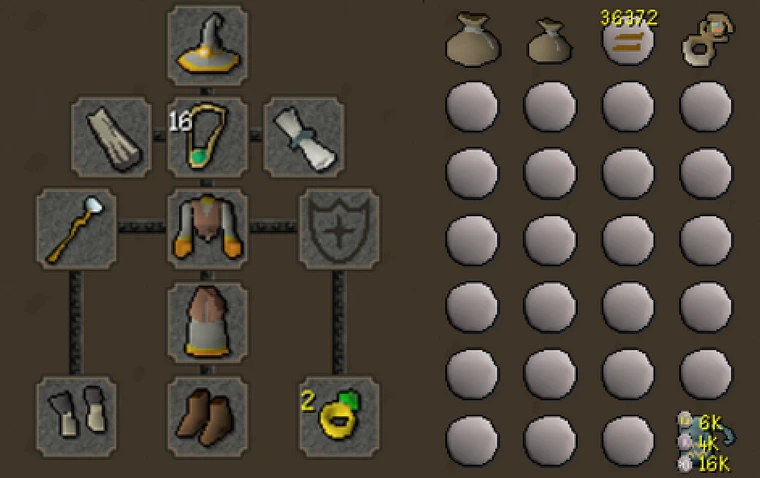
Fire Altar Combos Example Setup
- Elemental Rune and Pouches must be in the first row
- Magic Imbue is highly recommended
- Example Gear Setup - Staff is Steam staff for magic imbue



Smart Click
General Info
- Smart Click, often referred to as “One Click” or "IntelliClick" from other providers, is a set of plugins which allow you to Left Click anywhere on the game screen to redirect your clicks to the correct actions for various methods
Supported Methods Info
- Aerial Fishing: Bring a knife to Molch Island, pick up a King Worm (or have Fish Chunks in your inventory already), stand on the East side of the island and start clicking! It’ll automatically send the bird, cut the fish and repeat!
- Agility: Travel to your selected course in the config and start clicking! Seers TP is automatically supported if you have the diary completed and runes to cast it and it will (optionally) pick up Marks of Grace. It can also boost with Summer pies if you have them in your inventory and your agility level is below the required level for the selected course. "Zero Time" methods - High Alching and Bolt/Dart Fletching - are also supported
- Alchemy Room (MTA): Supports both Low and High Alch. Have a fire staff equipped (or other unlimited source of fire runes) and nature runes in your inventory, enter the Alchemy Room and start clicking! It will look the cabinets for the best item and alch them
- Barb Fishing 3T: This is for Barbarian fishing at Barbarian Outpost, or outside CoX - not fly fishing - Make sure you have your tick manipulation items of choice in your inventory (Knife + 1 Mahogany/Teak Log or 1 clean Guam Leaf + 15 Swamp Tar + Pestle and Mortar). Make sure you don’t have more than ONE tick manipulation item, i.e. only bring ONE clean Guam Leaf, and don’t bring two different methods. You must be clicking very fast in order for this to work correctly, most will use Auto Clicker - recommended auto clicker settings can be found here

- Battlestaves: This will craft battlestaves - enter the itemID for the orb you will be using in the "Crafting Config" section. ItemIDs can be found using the Gsoft Manager plugin, Examine Debug or Inventory IDs setting
- Construction: Supports Oak Larders and Mahogany Tables, select in the "Con Config" section. You must have a hammer and saw (supports equipable versions), Demon Butler, Rope bell-pull, Servant's money bag and set the Demon Butler to fetch 24 oak/mahogany planks from the bank.

- Glassblow: Have the glassblowing pipe in your inventory and craft at least 1 of whatever you want to glassblow, the plugin will create whatever your last made item is
- Drift Net: Does drift net fishing for hunter and fishing xp. Have drift nets stored in the NPC and some Stamina potions in your inventory. If banking the loot, make sure you have the in game setting "Esc to close interfaces" turned on and have Numulite in your inventory.
- Recommended equipment: Trident, or Dragon harpoon equipped, Fish bowl helmet, Diving apparatus, Graceful body, legs and gloves and Flippers
- Echo Moth: Originally for Leagues, this will simply left click on whatever NPC you "shift right click tagged" - Useful for catching butterflies/moths. It will not empty jars
- Graveyard Room (MTA): Does the MTA Graveyard room, have a mud staff equipped, or other combination of staff/runes to cast either Bones to Bananas, or Bones to Peaches. It will not eat
- Herbi: Hunts herbiboar and harvests them. Supports stamina potions and dropping unwanted herbs/fossils
- This will not bank - once your inventory fills up it will continue hunting them for hunter xp, but will not harvest
- Mining: Shift Right Click “Mark” the Rocks in the order you’d like to mine them. If you are doing 3T4G, make sure you have the tick manipulation items you will be using in your inventory (Knife + 1 Mahogany/Teak Log or 1 clean Guam Leaf + 15 Swamp Tar + Pestle and Mortar). It also supports depositing Sandstone into the Grinder, this is done automatically if mining Sandstone
- Mixology: Does the Mixology minigame. You must be clicking at least 1 time per game tick for this to work properly - Auto Pray Flick with double click mode turned off is perfect for this - Keep a lot of paste in your inventory and don't have any unfinished potions sitting in the processing stalls
- Refiner: This is for creating paste for Mixology, keep noted herbs in your inventory that you'd like it to use
- Tele Room (MTA): Have an air staff equipped (or another source of unlimited air runes) and law runes in your inventory. Enter the Tele Room portal and start clicking
- Tithe Farm: Before getting started, if you have the "Tithe Farm Improved" plugin from the Plugin Hub, uninstall it, as it will break the plugin! Have a spade, seed dibber and 8 watering cans in your inventory (gric's can is not supported). Simply grab the seed type you'd like to use and enter Tithe Farm and then start clicking. Supports stamina/energy potions and humidify, just have them in your inventory and it will automatically use them.
- Tick Teaks (1.5t): The 1.5t teak method can only be done at the Fossil Island tree patches. You must have Forester's rations and tick manip items, such as 1 clean guam, 15+ swamp tar and a pestle and mortar. You must be clicking very fast for this method to work correctly, most will use Auto Clicker - recommended auto clicker settings can be found here
- Thieving: “Shift right click” target the NPC you’d like to pickpocket, or blackjack. The plugin will automatically eat, equip new Dodgy necklaces, open coin pouches, cast Shadow Veil and also supports the "prayer method" for those that want to use Redemption for healing instead of food
Tomb Assist (TOA)
Bot Config
- Enable: Click "not set" and choose a hotkey to toggle the plugin on/off
- Disable Prayers on Complete: Having this enabled will make the plugin turn off your prayers when a room is complete
Overlay Config
- Projectile Overlays: Outlines projectiles in correct prayer color and adds tick timers on player
- Projectile Font Size: Set the size of the font on Projectile Overlays
Akkha/Path of Het Config
- Simon Says Solver: Show overlays for the Simon puzzle - uses Sound Based Detection, make sure your in-game Sound Effects are on at least 1%
- Pray Magic on Orbs: Enable Protect from Magic against the orbs during the final phase (slightly reduces damage taken)
- Keep Back: Enable this if using the Keep Back invocation
- De-prioritize Invuln: Enabling this will hide the attack option on Akkha when he goes invulnerable when his shadows appear
- Outline Unstable Orbs: Outlines the unstable orbs on intersection with the player during the final phase of the Akkha fight.
Baba/Path of Apmeken Config
- Outline Weak Ball: Shows an overlay on the weak ball Ba-Ba throws
- Highlight Banana Tiles: Highlights the tiles bananas are on during the Ba-Ba fight.
Kephri/Path of Scabaras Config
- Outline Dung Target: Shows an overlay outlining the Dung Target during the Kephri fight.
Zebak/Path of Crondis Config
- Conserve Prayer: Flicks the overhead prayers instead of leaving them active throughout the fight.
Warden Config
- Bypass Melee Checks: This will make the plugin camp pray melee if you're in melee range of the Warden during p2
- Draw Safespots: Places a vertical green line column of tiles that show where you should be standing based on the Wardens’ current attack. If this is checked you must also update the Slam Ticks setting.
- Slam Ticks: Determines the number of ticks each of the Wardens’ attacks takes, in order to properly determine when the safespot changes. Based on invocations, the attack speed changes, so you need to change the number of ticks with it. Set the ticks to one of the following based on your setup:
- Entry Mode/No Warden P3 Invocations: 5
- Overclock 1: 4
- Overclock 2: 3
- Insanity: 3
- Insanity Invocation: Enable if using the Insanity invocation. This will ensure that the safespot column tracks the last attack location, as it doesn’t reset after the skull phase with Insanity enabled.
- Fill Warden Safespots: Allows you to better control the fill and opacity of the Warden Safespots. Use Color Config to adjust as desired.
Gear Config
Supports Advanced Swapper sets (swap:SetName) and (id,id,id) formats
- Enable Gear Swaps: Check if you want to enable the following gear swaps
- Core Swap: What gear to swap to when the core comes out
- Skull Swap: What gear to swap to when the skulls appear
- End Skull Swap: What gear to swap to after you kill the skulls
Thrall Config
Allows you to select the ability to summon thralls of your choice during the following fights, to assist with your battles
- Ba-Ba
- Kephri
- Zebak
- Warden P1
- Warden P2 (since only one attack style works against the Warden at a time during this phase, it will summon whichever style matches)
- Warden P3
Zulrah Swapper
General Info
- You must kill Zulrah within a full rotation, or the plugin will stop functioning. A new rotation happens after "Jad Phase". There is no way for the plugin to determine what new rotation the game chose
Bot Config
- Auto Vengeance: The plugin will cast Vengeance when the Blue phase shoots a ranged attack at you
- Use Offensive Pray: Automatically attack flick your selected offensive prayers when you're attacking
Swap Config
Supports Advanced Swapper sets (swap:SetName) and (id,id,id) formats
- Maging Gear: If using Mage, what mage gear to swap to
- Ranging Gear: If using Range, what range gear to swap to
[BETA] Yama Helper
Main Config
- Enable: Click "not set" and choose a hotkey to toggle the plugin on/off
Yama Config
- Prayers: Smart Click, Auto, or None
- Smart Click: Swapping Overhead prayers will require you to click your mouse, anywhere on the game screen
- Auto: Automatically swap Overhead prayers
- None: The plugin will not pray automatically
- Interact Check: This will make the plugin only pray melee if Yama is targeting you
- Donofly Enrage: Enable if doing the "fly" methods, the plugin will no longer pray melee during Enrage phase
- Boulder Overlay: Shows an overlay for the Boulder attack
- Divine Severance: Make the plugin only enable prayer on the last possible tick, mainly for the Divine Severance contract
- Prayer Overlay: Shows an overlay for what to pray, for if you're not using auto/smart click prayers
- Wave Overlay: Shows an overlay for the Wave attack