Auto Clicker
Main Config
Toggle
- Click “not set” and press a keyboard button to choose a hotkey that will turn the Auto Clicker on/off
Delays - All delay values are in milliseconds. 600 = 1 game tick and 1000 = 1 second
- Absolute Delay Min: The absolute minimum delay it can use. The fastest click time
- Absolute Delay Max: The absolute maximum delay it can use. The slowest click time
- Delay Target: The peak of the curve, the value most commonly used. This number should be somewhere between the Min and Max
- Delay Deviation: How far it can deviate from target and still remain common. This number will be added, or subtracted, to the Delay Target and kept within the Min and Max
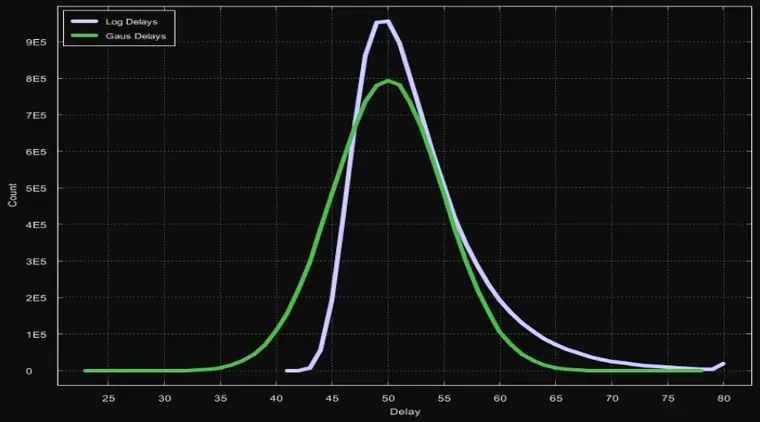
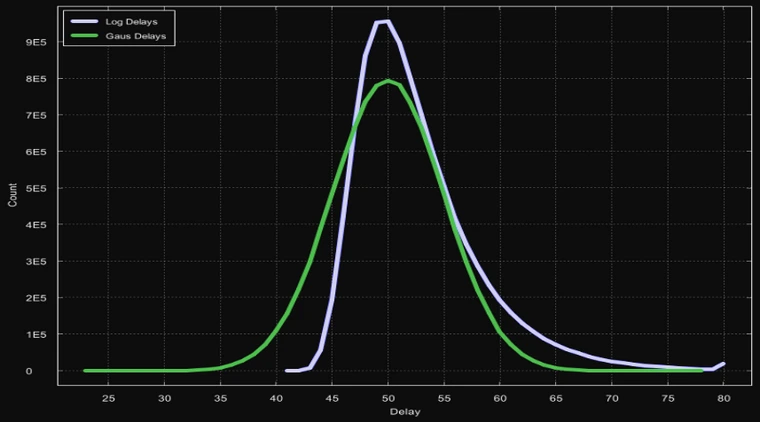
- Weighted Distribution: (Highly Recommended) This will turn the standard bell curve into a right shifted bell curve (Example Below)
Use MouseEvents - Due to changes RuneLite made, this is always forced on, even if it's unchecked
- This will make the plugin use MouseEvents to click where you mouse was when you toggled the plugin on, instead of clicking where your mouse currently is, no longer requiring your mouse. Using this does increase the risk of the plugin
Click Distribution Examples
- Below is a picture of a 10,000,000 click sample size at settings min=20, max=80, target=50, deviation=5
- Blue is a weighted distribution
- Green is the standard distribution